Groups
Purpose of Groups
- Groups are used in ODM to simplify collaboration and data sharing.
- Groups can represent locations, departments, or project teams, ensuring data is shared only with the relevant people.
- Users see only the groups they are members of, unless they hold the Manage groups permission.
Suggested groups structure:
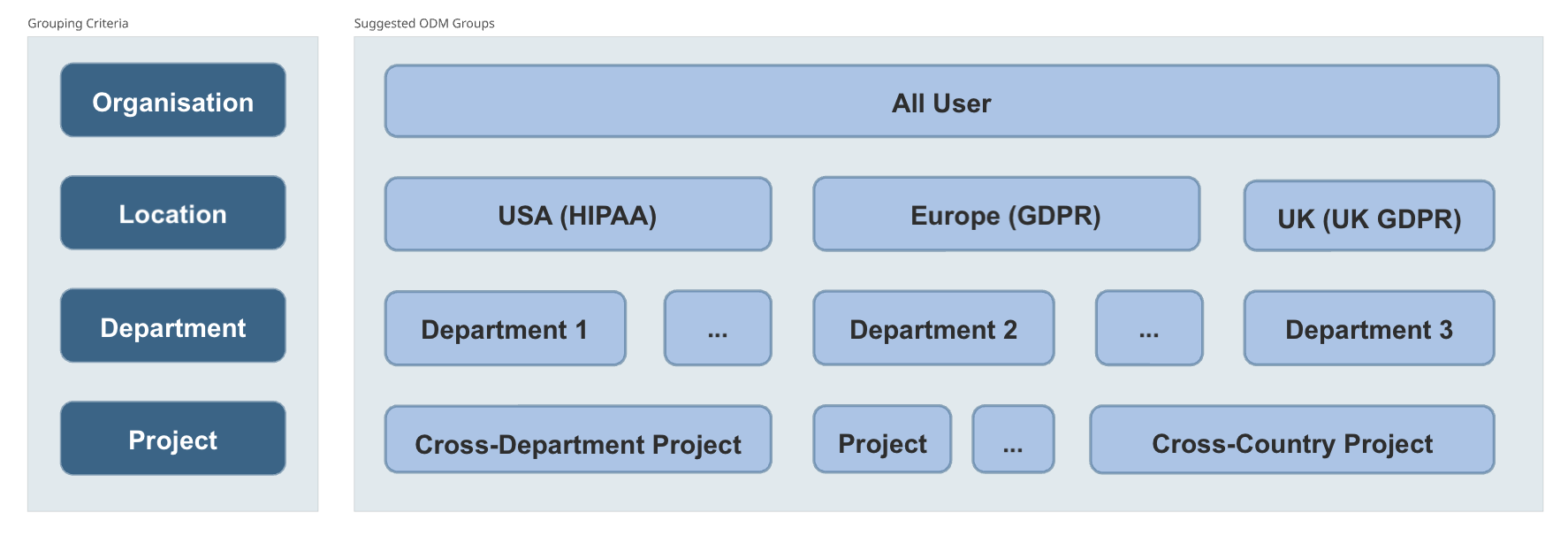
The list of all groups you are a member of can be browsed on the Groups page. A user with Manage groups permission can browse and manage all groups available in the system.
Creating Groups
-
Groups can be created in two ways:
- Manually in the ODM graphical user interface.
- Automatically via the SCIM API for integration with identity providers.
-
Prerequisites: None. Any user can create a group and invite other members.
Default Groups
Upon installation, ODM creates two default groups (these should not be removed):
- All users: all users are automatically added to this group.
- Curator: a special group that grants edit permissions to members.
Group Roles
- Group members: can access all data shared with their group and can share data with the group.
- Group admins: can add or remove members and assign roles within their group. Admin rights do not extend to other groups.
- Special permission: a user with Manage groups can manage all groups in the system, even if they are not a member.
Once a user is added to a group, they immediately have access to all studies shared with the group. Removing a user from a group will revoke their access to all studies shared with the group.
Curator Group
- Membership in the Curator group grants edit permissions.
- Curators can import new studies, edit metadata, and track changes through version history.
- Non-curators are considered researchers: they can browse and download but cannot contribute.
If a user is not a member of the Curator they are considered as researchers and are able just to browse available studies and retrieve data, but not contribute to it.
| Role | Member of Curator group? | Role |
|---|---|---|
| Researcher | No | Browse, Search, Download |
| Curator | Yes | All of the above + Import Data, Edit Metadata |